What is dynamic DNS (DDNS)?
If you’ve ever wondered how you can access your home devices, like a security camera or a home server, from anywhere in the world, you’ve probably come across something called Dynamic DNS (DDNS). Don’t worry if it sounds a bit technical—I’ll break it down in the simplest way possible.
What is DNS?
Before we dive into DDNS, let’s quickly understand DNS (Domain Name System). DNS is like a phonebook for the internet. When you type a website’s name, like example.com, into your browser, DNS helps translate that name into an IP address, which is the actual address of the website on the internet.
What is Dynamic DNS (DDNS)?
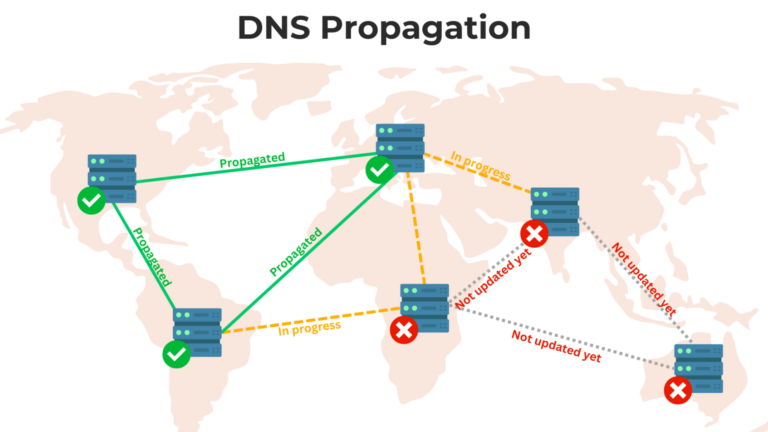
Dynamic DNS (DDNS) is a service that automatically updates the IP address of a device in real-time. This is useful because most home internet connections don’t have a fixed IP address; instead, the IP address can change frequently.
With DDNS, you can link your changing IP address to a fixed domain name. This means you don’t need to keep checking your IP address or worry about it changing. You’ll always be able to access your devices using the same domain name.
Why Do IP Addresses Change?
Most internet providers give you a “dynamic” IP address. This means your IP address can change every time your router reconnects to the internet. It’s cheaper for internet providers and works fine for most people, but it can be frustrating if you want to access your devices remotely.
How Does DDNS Work?
Here’s how Dynamic DNS works in simple steps:
- You Sign Up for a DDNS Service: You register with a DDNS provider like No-IP, DynDNS, or DuckDNS.
- Link a Domain Name: You choose a domain name, such as
myhome.ddns.net. - Install a DDNS Client: You install a small program on your device (or sometimes, it’s built into your router) that communicates with the DDNS provider.
- Automatic Updates: Whenever your IP address changes, the DDNS client notifies the DDNS provider, which updates your domain name to point to the new IP address.
- Access Your Device: You can now access your device using the same domain name, even if your IP address changes.
When Do You Need DDNS?
Dynamic DNS is helpful in many situations, such as:
- Accessing Security Cameras: Monitor your home cameras remotely without worrying about IP changes.
- Running a Home Server: Host your own website or files at home and access them with a fixed domain name.
- Gaming Servers: Allow friends to connect to your game server easily.
- Remote Desktop: Log into your home computer from anywhere in the world.
Pros and Cons of DDNS
Here’s a quick look at the advantages and disadvantages of using DDNS:
| Pros | Cons |
|---|---|
| Easy remote access | Some DDNS services aren’t free |
| No need to remember IP addresses | May require initial setup effort |
| Works with most devices | Depends on your internet setup |
How to Get Started with DDNS
If you’re ready to set up DDNS, here’s a quick guide to get you started:
- Choose a DDNS Provider: Some popular options include No-IP, DynDNS, and DuckDNS. Many of them offer free plans.
- Register for an Account: Sign up and create a domain name for your devices.
- Set Up Your Router or Device: Most modern routers have built-in support for DDNS. Log in to your router’s settings and look for the DDNS section. Enter your provider’s details and the domain name you registered.
- Test It Out: Try accessing your device using the domain name you set up to make sure everything is working.
Final Thoughts
Dynamic DNS is a simple yet powerful tool that makes it easy to access your home devices from anywhere. Whether you’re checking your security cameras, hosting a website, or playing games with friends, DDNS ensures you don’t have to deal with constantly changing IP addresses.